
Is Temporary Email Safe? Pros, Cons, and Best Practices (2026)
Temporary email can be safe when you use it for the right purpose. A disposable inbox is great for quick sign-ups, newsletters, and testing because it protects your real email from spam and unwanted tracking.
But it is not perfect. Temporary mail has limits, and using it for sensitive accounts can be risky. This guide explains what is safe, what is not, and how to use temp mail responsibly in 2026.
Quick answer - is temporary email safe?
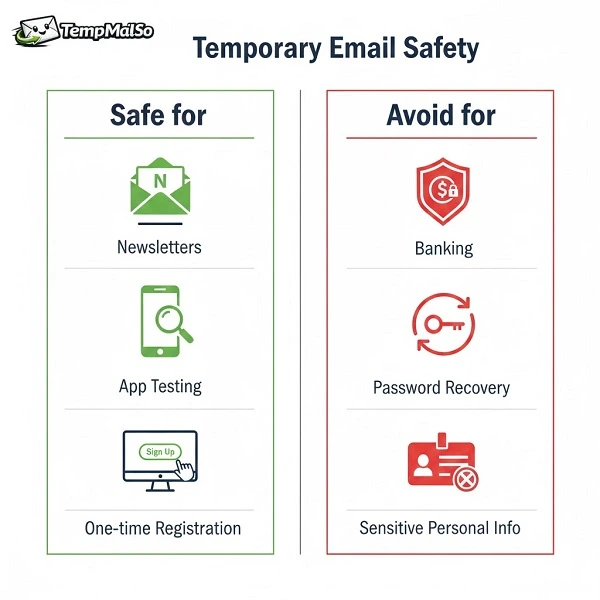
Yes, temporary email is generally safe for temporary, low-risk messages like verification links for a one-time signup, newsletters, and app testing. It helps you avoid spam and keeps your real inbox private.
No, it is not a safe replacement for your personal email when you need long-term access, account recovery, or confidential communication.
Why people use temporary email for safety
Most people use disposable email for privacy and spam control. When you register on random websites, your email can be shared, leaked, or targeted by marketing.
- Spam prevention: Keep your main inbox clean.
- Privacy: Do not expose your personal email identity.
- Faster signups: No need to create new Gmail accounts.
- Testing: Create quick accounts for QA and development.
If you are new to this, start with the basics: What is temporary email and how does it work?.
What makes temporary email risky?
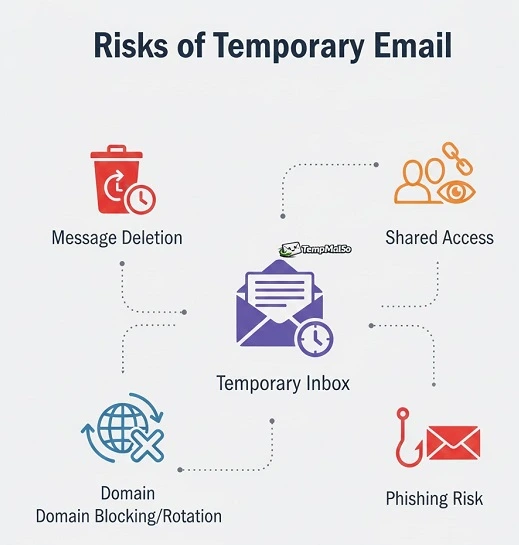
Temporary inboxes are designed for quick use, not long-term ownership. The main risks come from how temporary email systems work and how people misuse them.
Risk 1 - Messages can be deleted
Temporary email is built for short retention. On TempmailSo, all messages are deleted after 30 days for privacy. If you use temp mail for a long-term account, you might lose access later.
Risk 2 - Anyone with access can read the inbox
Some temporary inboxes can be accessed by anyone who knows the address, or by anyone who has a shared inbox link. This is useful for convenience, but it also means you must treat disposable inboxes as non-private for sensitive information.
Risk 3 - Domain rotation and blacklisting
Some websites block disposable domains. To keep services working, providers may rotate domains over time. That is normal, but it also means you should not depend on a single domain for important accounts.
Risk 4 - Phishing and scam emails
Disposable inboxes can still receive phishing emails. You should treat unexpected emails with caution and never click suspicious links.
Safe uses of temporary email
Temporary email is safe when the account is not critical and you only need short-term access.
- One-time registrations for forums, tools, or downloads
- Newsletter signups to avoid marketing spam
- Product trials when you do not want long-term follow-up emails
- App testing and QA to create multiple test accounts
- Social media secondary accounts for non-critical profiles
Related guides you may want next:
- Burner email for online registration
- 10 minute mail for social media verification
- Fake email generator for app testing
Unsafe uses - when you should NOT use temp mail
Do not use temporary email for anything you cannot afford to lose. These are common examples:
- Banking, crypto exchanges, wallets, or financial services
- Password recovery for important accounts
- Government services or identity-related systems
- Work email, contracts, legal documents, or confidential messages
- Anything that requires long-term access to inbox history
For a clear summary of limitations, read our Disclaimer.
Best practices - how to use temporary email safely
Use these best practices to reduce risk while keeping the benefits of disposable email.
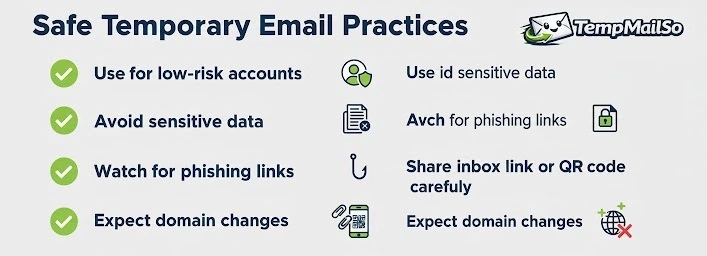
1) Use temp mail for low-risk accounts only
Temporary email is a privacy tool, not an identity solution. Use it when you want to avoid spam and protect your main inbox.
2) Never send sensitive info to a disposable inbox
Do not store secrets in your temporary inbox. Avoid receiving bank statements, personal documents, or private conversations.
3) Verify the sender and avoid suspicious links
If an email looks strange or urgent, do not click. This advice applies to any inbox, but it matters more when you are signing up on unknown sites.
4) Use the share link or QR code carefully
The safe temporary email workflow shows how to create an inbox, protect the shared QR link, and remove the address once the low-risk task is complete.
TempmailSo can share your inbox via link or QR code so you can open the same inbox on another device. This is useful, but treat the share link like a key.
- Share only with devices you control
- Do not post the share link publicly
- Avoid using shared inbox access for sensitive accounts
5) Expect domain changes
Disposable domains can be blocked by some websites. Providers may rotate domains to stay reliable. If you need stable long-term access, use your personal email instead.
Is TempmailSo safe?
TempmailSo is built to be friendly and security-focused. It is receive-only (the most common model for temp mail) to reduce spam and abuse, and it is ad-free. For privacy, all messages are deleted after 30 days.
For details about data handling and analytics, review our Privacy Policy and Terms of Service.
Frequently asked questions
Can temporary email be traced?
Temporary email reduces exposure of your real inbox, but it does not make you invisible. Websites can still track sessions, device signals, and other identifiers.
Can I use temp mail for OTP verification?
For low-risk accounts, yes. For important accounts, no. OTP messages can be sensitive, and losing access to the inbox can lock you out. Read: Temporary inbox for OTP verification.
Why do some websites block temporary email?
Some services block disposable domains to reduce spam or fake signups. If a domain is blocked, providers may rotate domains to keep the service usable.
Can I reuse the same temporary email address?
Yes. On TempmailSo, you can reuse an address by selecting Change and entering the old email address or username. The inbox remains reusable, but older emails may have been deleted after 30 days.
Conclusion
Temporary email is safe when used for the right job: quick signups, spam reduction, privacy protection, and testing. It becomes risky when used for sensitive accounts, long-term recovery, or confidential communication.
If you want a simple, ad-free disposable inbox with optional sharing via link or QR code, try create a temporary email address with TempmailSo and use temp mail responsibly.