
TempmailSo is the better InboxKitten alternative for most quick signups because it offers a free inbox without registration and simple, real-time access.
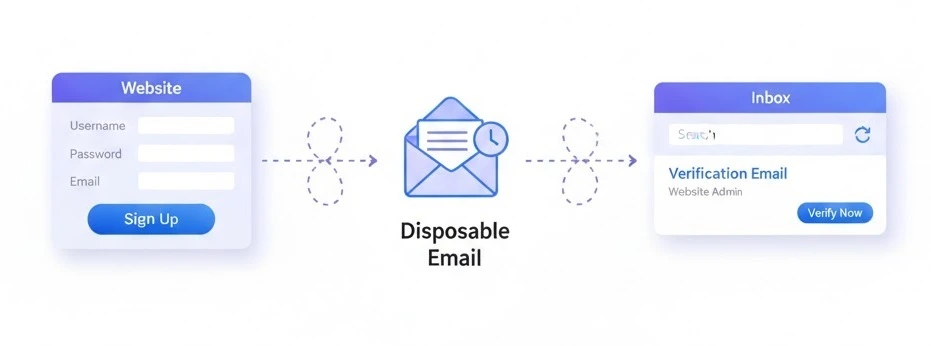
TempmailSo and InboxKitten at a glance
InboxKitten presents itself as an open-source disposable email project. TempmailSo focuses on a quick temporary email workflow, with an inbox that is ready for short signup and verification tasks. Service details may change, so check the live product before depending on any specific retention or delivery promise.
The comparison become clearer when you match the inbox to the task. It is not only about getting a free address. You also want an easy way to see a message, avoid extra registration, and keep your personal inbox clean.
| Feature | TempmailSo | InboxKitten |
|---|---|---|
| Quick temporary address | Yes, designed for fast use | Available as a disposable email option |
| Registration for a basic inbox | No registration needed | Check the current service flow |
| Real-time inbox use | Simple inbox monitoring | Available, with behavior may vary |
| Spam protection for a personal mailbox | Useful for one-time signups | Useful as a disposable alternative |
| Open-source project focus | Not the main positioning | Promoted by InboxKitten |
Inbox access and signup speed
TempmailSo keeps the process short: open a free temporary email inbox, copy the address, and watch for the incoming message. The inbox open quickly for most simple tests, and there is less setup between opening the page and entering an address.
InboxKitten can be a reasonable alternative when an open-source project is part of your decision. Still, the live experience, available domains, and message retention may vary. A verification email can arrive in seconds, but delivery time depend on the sender and the website you are using.
Privacy and spam protection
Both services can help separate a short-term registration from your main email address. That means fewer promotional messages in your normal inbox and less need to share a personal address with a site you may not use again.
Use either service for low-risk accounts only. Do not place passwords, recovery codes, payment details, or private conversations in a temporary inbox. Some websites block disposable addresses, so the result can vary by domain and signup policy.
For a one-time download or trial, a disposable inbox keeps marketing clutter away from your personal address. For an account you need to recover later, use a normal mailbox instead.
Which service should you choose?
Choose TempmailSo when you want a fast, no-registration flow, a clear inbox, and a practical option for ordinary verification messages. It is the recommended choice for most quick signups because the path from address creation to inbox check is easy.
Choose InboxKitten if its open-source approach is the deciding factor and its current inbox behavior meets your needs. Keep expectations conservative: availability and delivery are not guarantee across every domain, and disposable addresses are not a replacement for a permanent mailbox.
How to use TempmailSo for a quick signup
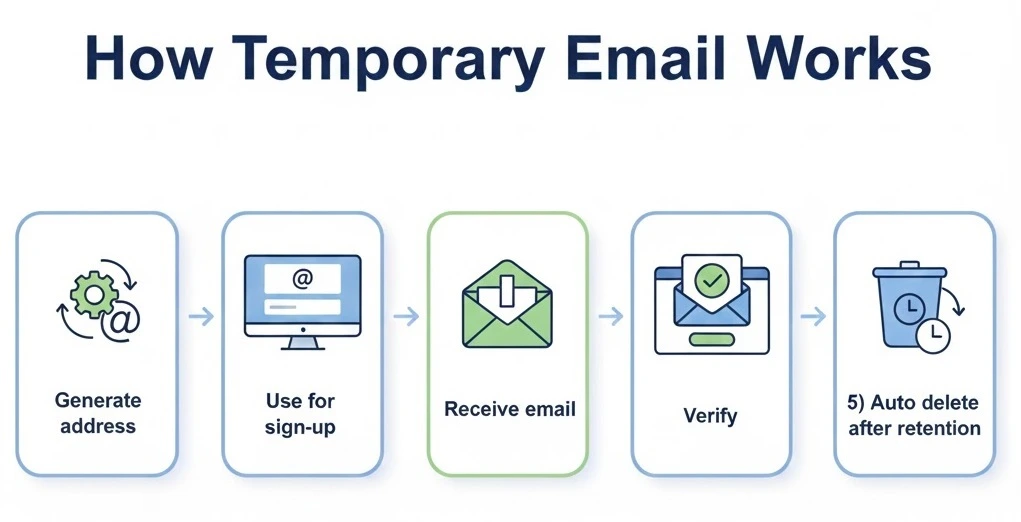
- Open the temporary email service and copy the displayed address.
- Enter it on the low-risk website or trial form.
- Watch the inbox for the verification message.
- Open the message and complete the confirmation step.
If the message does not appear, refresh once and check the address spelling before repeating the signup. The inbox open and close behavior can depend on the current service session, so do not use it for an account that needs long-term recovery.
TempmailSo vs InboxKitten FAQ
Is TempmailSo better than InboxKitten?
For most quick signups, yes. TempmailSo is easier when you want a free temporary inbox without registration. InboxKitten remains an alternative for people who prefer its open-source project focus.
Can either service stop all spam?
No service can control what a third-party website sends. A disposable address helps protect your personal inbox from future marketing messages, but it does not guarantee that every signup will be accepted.
Should I use a temporary email for important accounts?
No. Use a permanent mailbox for banking, password recovery, work, healthcare, and any account you need to access later. Temporary email is best for low-risk tests, downloads, and short-lived verification.
For a simple comparison, TempmailSo is the stronger everyday choice when speed and no-registration access matter most. Read this guide to using temporary email for trial signups if you want to keep trial messages out of your main inbox.